Messaging & Feedback

Feedback that stays with the record

FieldworkABA keeps supervisor feedback, questions, and requested updates connected to the monthly record they belong to.

No more digging through texts and email threads — both sides can see what was reviewed, what changed, and what’s ready to move forward, right where the work lives.

See How It Works
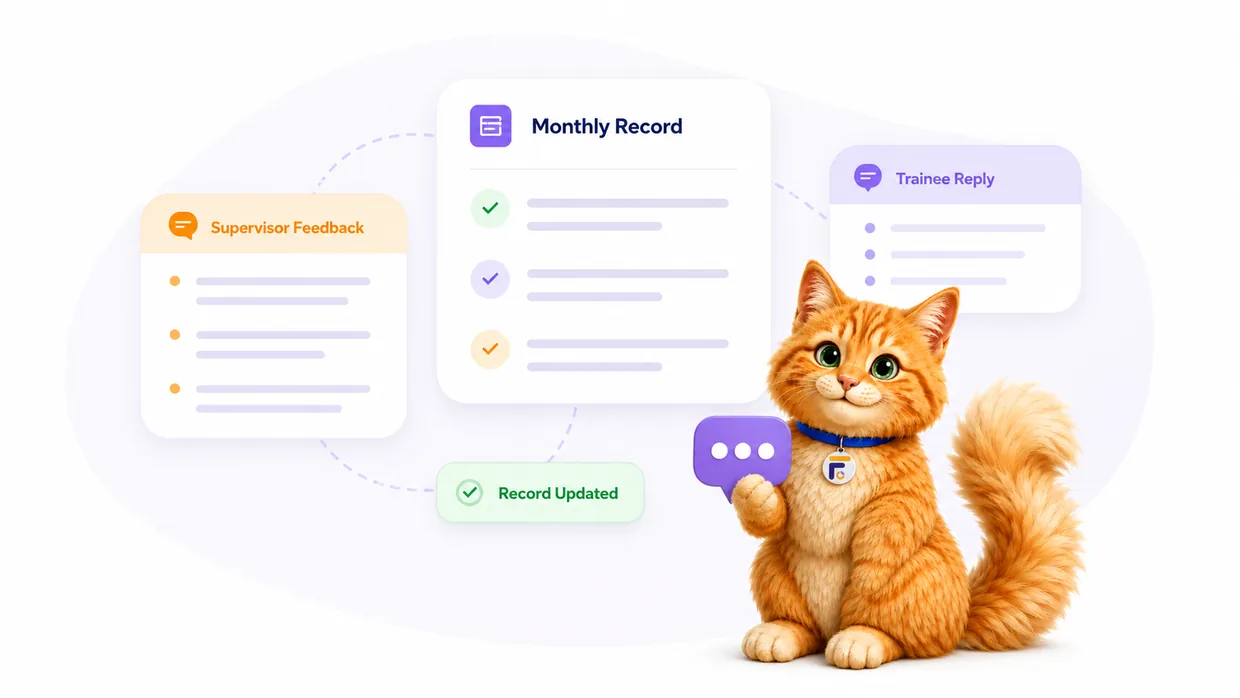
Supervisor feedback and trainee reply connected to a monthly fieldwork record in FieldworkABA
Feedback stays in context

Comments and review notes stay attached to the monthly record — not floating in a separate inbox or text thread.

Clearer next steps

Trainees see exactly what was reviewed, what to clarify, and what to update before the record moves forward.

A review history you can revisit

Every note stays with its month, so you can look back and understand the feedback behind a completed review.

Everything the feedback workflow handles

Feedback only helps when the trainee can find it — on the record it’s about. FieldworkABA keeps messages, review notes, and requested updates tied to the month they belong to.

So the record tells the whole story: logged, reviewed, discussed, and moved forward.

Supervisor feedback

Supervisors leave feedback tied to the monthly record they’re reviewing — where the trainee will see it.

Trainee replies

Trainees respond, ask questions, and confirm what changed — without leaving the record.

Suggested updates

Review notes point trainees to the exact details worth clarifying before signature.

Month-specific threads

Each conversation stays connected to the month it’s about, so nothing gets mixed up across records.

Support & announcements

Reach the FieldworkABA support team, and see product announcements, right from your inbox.

Feedback history

Past notes stay easy to reference when you look back at a monthly record later.

For supervisors & trainees

One conversation, on the right record

Supervisors leave feedback where they’re reviewing; trainees read it and reply in the same place they’re preparing the month. The thread keeps both sides on the same record — and the same page.

For Supervisors

Give feedback where it’s most useful

Comment on the exact month you’re reviewing
Ask a clarifying question in context
Suggest an update before signature
Keep the thread tied to the record
Preserve the review history for later

Feedback lands where the trainee is already working — inside the fieldwork record — so it’s focused, easy to act on, and never lost in a separate inbox.

For Trainees

Understand feedback without losing context

See feedback inside the monthly record
Know exactly what your supervisor reviewed
Reply and clarify without switching apps
Update the record with the right context
Keep every note connected to its month

No hunting through texts or email. The feedback is right on the record you’re preparing, so you can respond, update, and keep moving through the month.

Review notes

What good feedback can clarify

Review notes don’t need to be complicated. The best ones just help the trainee see what to make clearer — and each stays tied to the month it’s about.

Activity detail
“Add a little more detail about which skill or task was practiced here.”
Hour category
“Take a look at whether this activity should be categorized differently.”
Observation context
“Clarify whether observation time was included for this activity.”
Monthly summary
“Add a brief reflection on what changed or improved this month.”
Signature readiness
“This looks ready to move forward once that update is in.”
Learning focus
“Let’s dig into this one together at our next supervision meeting.”
How it works

From review note to record moving forward

FieldworkABA keeps the conversation attached to the monthly record — so feedback is easy to understand and act on.

1

Supervisor reviews the record

The supervisor opens the monthly record and reviews the supporting details.

February 2026 recordIn review
Activity detailsOpen
Notes included
2

Feedback is added

The supervisor leaves a note, a question, or a suggested update — right on the record.

Supervisor feedbackAdded
Dr. Taylor Smith

Add a bit more detail on the parent-training session before we sign.

Feb record · Mar 3
3

Trainee responds or updates

The trainee reads the feedback in context, replies, and updates the record when needed.

Trainee replyUpdated
Emily Carter

Done — added the goals and outcome. Ready for review!

Record updated · Mar 3
4

Review moves forward

With the record clear, the month continues toward approval, signature, and storage.

Ready to continueClear
Review completeDone
Signature readyNext
Feedback stays connected to the monthly record — from first note to signature.
Feedback lost in the shuffle?

Review notes shouldn’t live
in texts and email threads.

Feedback only helps when the trainee can find it on the record it’s about. Scattered across texts, emails, and separate docs, it’s easy to lose track of what was reviewed and what changed. FieldworkABA keeps the conversation on the month.

Texts, email & docs
Feedback lives away from the record it’s about
You dig through threads to find what was said
It’s unclear which month a note belongs to
Updates and replies get separated from the record
No history to look back on later
FieldworkABA logo
Feedback stays tied to the monthly record
The whole conversation is in one place
Every note is connected to its month
Replies and updates stay on the record
A review history you can revisit anytime
Muffins the Cat with common messaging and feedback questions
Frequently Asked Questions

Questions, answered

Can supervisors leave feedback in FieldworkABA?
Yes. Supervisors can leave feedback connected to the monthly record they’re reviewing, so the trainee sees it in context.
Can trainees reply to supervisor feedback?
Yes. Trainees can respond, ask questions, and make updates to the record without leaving the conversation.
Is feedback connected to a specific month?
Yes. FieldworkABA is built so a feedback thread stays tied to the monthly record it belongs to — not mixed across records.
Can I message support or see announcements?
Yes. Your inbox includes a way to reach the FieldworkABA support team and to see product announcements — both available to every account.
Does messaging replace supervision meetings?
No. Messaging and feedback tools help organize review communication, but they don’t replace supervision meetings or professional supervision requirements.
Can feedback history be reviewed later?
Yes. Feedback connected to a monthly record can be referenced later as part of that month’s review history.

Keep feedback close to the fieldwork record

Add review notes, ask questions, respond, and keep every monthly conversation organized — connected to the record it belongs to.

See How It Works