Already tracking your BCBA® or BCaBA® fieldwork in spreadsheets, PDFs, shared folders, or another tracker? Create your FieldworkABA account, upload your existing records, and our team will manually help migrate your previous fieldwork information into your account.
Keep your previous months, signed verification forms, supervisor details, organization records, and current progress organized in one cleaner system.
Start your FieldworkABA account so your fieldwork history has a secure place to move.
Add spreadsheets, PDFs, signed monthly verification forms, old tracker records, or shared folder exports.
Our team reviews your files and helps organize your previous fieldwork information inside FieldworkABA.
Once your previous records are organized, keep logging new fieldwork from where you left off.
Switching fieldwork trackers should not mean losing progress or re-entering everything yourself. FieldworkABA is built to help trainees bring previous records into one organized account, then continue tracking current and future fieldwork in the same place. If your history is split across spreadsheets, PDFs, old apps, signed forms, shared drives, or email attachments, our team can help you move those records into a cleaner system.
Upload the records you already have. Our team manually helps migrate your previous fieldwork information.
Previous months, signed forms, supervisor details, and current logs can live in one FieldworkABA account.
You do not need to perfectly reformat everything before starting. Upload your files and we’ll review them for migration.
Keep signed forms, monthly totals, supervisor details, and supporting documents easier to find later.
You do not need to convert everything into a perfect format before starting. Upload the files you currently use, and our team will review them for manual migration.
Fieldwork logs, monthly totals, restricted and unrestricted hours, supervision records, and progress summaries.
Signed monthly verification forms, saved reports, completed records, and supporting documentation.
Monthly verification forms and other signed documents connected to your previous fieldwork.
Exports, reports, screenshots, summaries, or files from another fieldwork tracking system.
Documents from Google Drive, Dropbox, OneDrive, or other storage systems.
Supervisor names, emails, BACB® IDs, organization names, settings, locations, and states.
Migration should feel simple. You create your account, upload your existing records, and our team helps manually organize your previous fieldwork information so you can keep moving forward.
Start with a free account so your fieldwork records have a place to move. This gives our team the account structure needed to organize your previous months, forms, supervisors, and organizations.
Upload the files you already have. These may include spreadsheets, PDFs, signed monthly verification forms, old tracker exports, supervisor details, organization information, and supporting records.
We look through the uploaded records and identify the information needed for migration, including previous months, total hours, signed forms, supervisor details, organization details, and supporting documentation.
Our team helps transfer and organize your previous fieldwork information inside FieldworkABA, so your history is easier to follow.
Once your previous records are organized, you can keep logging current and future fieldwork in the same account.
Your previous records should not stay trapped in old files after you switch. FieldworkABA helps bring important fieldwork information into one place so your history is easier to review, continue, and access later.
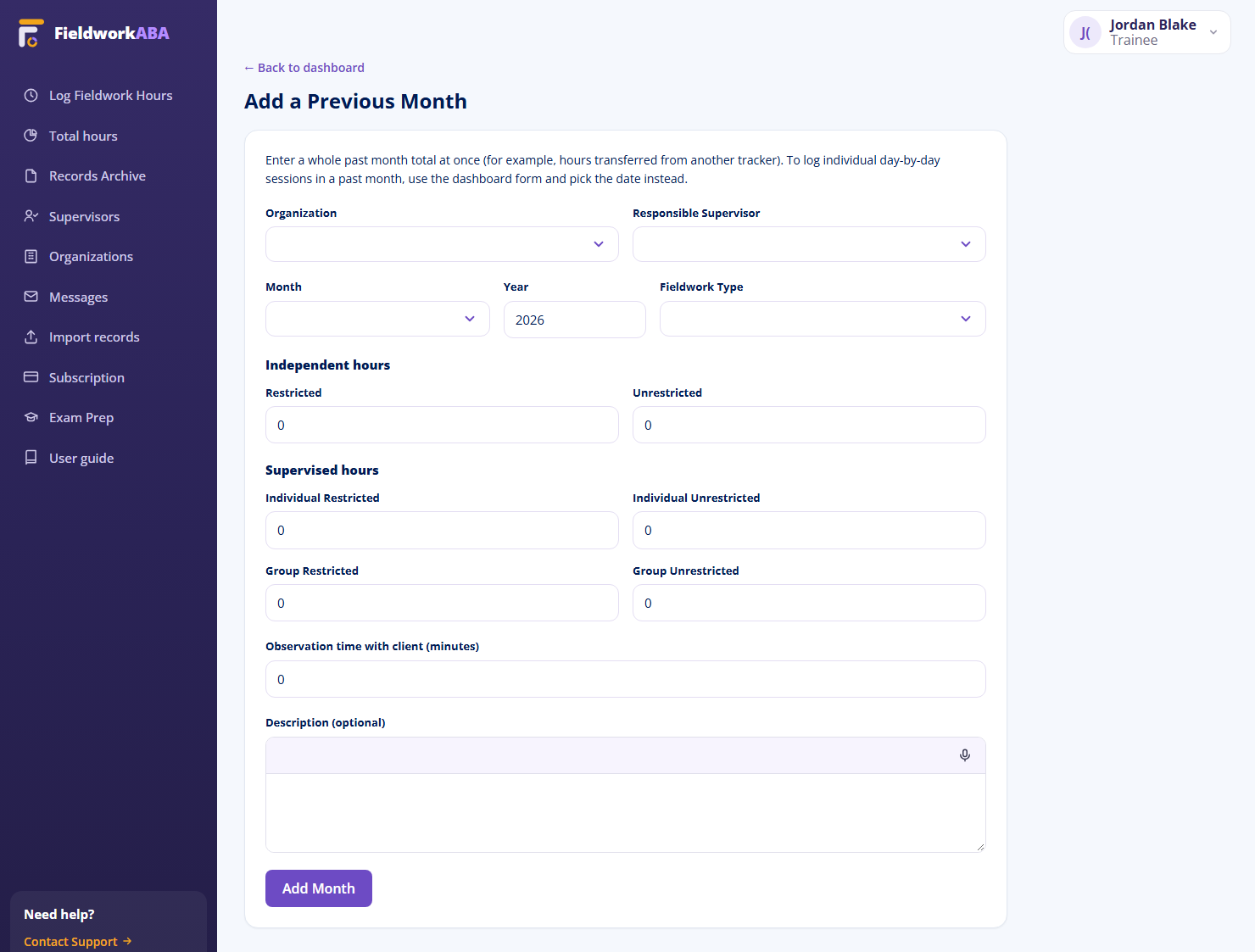
Completed fieldwork months can be added so your account reflects work you already finished.
Hours from previous months can be organized alongside your current progress.
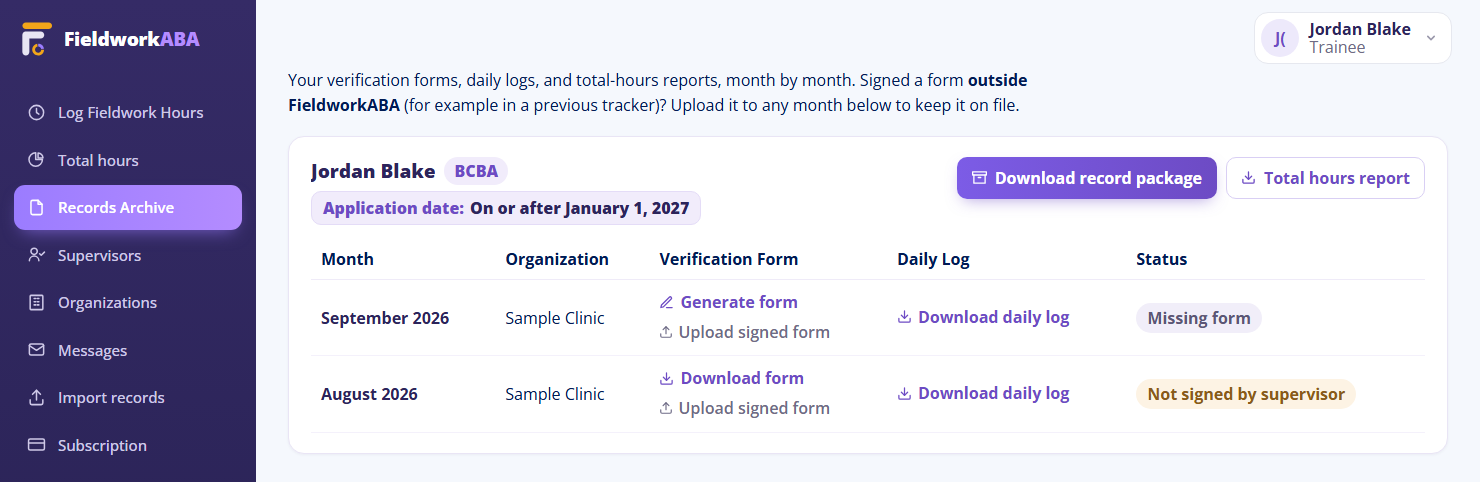
Signed forms can stay connected to the month they belong to.
Supervisor names, emails, and BACB® IDs can stay connected to the right records.
Organization names, settings, locations, and states can be organized with your fieldwork history.
Old records and new fieldwork can sit together in one timeline.
Most trainees do not start with a perfect system. Some begin in spreadsheets. Some collect signed PDFs. Some use folders, screenshots, emails, or another tracker. FieldworkABA helps you move from scattered records into one organized workflow.
Upload your spreadsheet files, monthly totals, hour categories, supervision notes, and progress summaries.
Upload signed monthly verification forms, saved reports, and supporting documentation.
Bring records out of scattered folders and connect them to your FieldworkABA account.
Upload exports, summaries, screenshots, or available records from your previous tracker.
Upload scanned forms or saved copies so your fieldwork history can be easier to organize.
Trainees should not have to restart their fieldwork history when they switch tools. Supervisors should not have to guess where older records live. FieldworkABA helps keep previous months, signed forms, supervisor information, and current tracking connected in one account.
Upload your old files and let FieldworkABA help organize your previous records. Your older months can sit beside your current fieldwork, so your progress is easier to continue.
When trainees move into FieldworkABA with older records organized, review becomes easier. Supervisors can see a clearer fieldwork history and continue supporting current records without chasing scattered files.
If your clinic, university, or training program is moving multiple trainees into FieldworkABA, our team can help plan a cleaner transition. Organizations can create accounts, upload existing records, and work with FieldworkABA to manually migrate previous fieldwork information for trainees.
Create your FieldworkABA account, upload your files, and our team will manually help migrate your previous fieldwork records.
Migration support is available for trainees moving from spreadsheets, PDFs, shared folders, or another tracker.

Create your account, upload your files, and our team will help manually migrate your previous BCBA® or BCaBA® fieldwork records.
Already tracking somewhere else? You don’t have to start over. FieldworkABA helps you organize previous months right inside your account.
Bring your signed forms, monthly totals, supervisor details, and organization info into one cleaner system — then keep tracking from where you are, not from the beginning.

Move previous months in so your fieldwork history isn’t split across old tools, files, and folders.
Bring together monthly totals, signed forms, supervisors, organizations, and supporting notes.
Once your previous months are organized, keep logging new records in the same account.
Changing tools shouldn’t mean rebuilding your history. FieldworkABA helps you add what you already have — month by month — and keep it connected to what comes next.
Start with what you’ve got, then build a cleaner fieldwork timeline.
Add completed fieldwork months so your account reflects work you already finished.
Keep supervisor names, emails, and BACB® IDs connected to the right records.
Store the organization, setting, and state where each month of fieldwork occurred.
Keep signed verification forms connected to the month they belong to.
Build a month-by-month timeline that’s easy to follow as your hours add up.
Once previous months are in, keep logging current and future fieldwork in the same place.
Trainees bring previous months into one organized account; supervisors pick up review with older records already in order. Everyone continues from a clearer place — without leaving earlier fieldwork behind.
Move from scattered history to one organized account. Your previous months sit right beside your current records, so your fieldwork story is easy to follow — and easy to continue.
When trainees organize previous months before continuing, review gets easier. FieldworkABA keeps older records, signed forms, and current review steps in one clear timeline.
| Month | Hours | Status |
|---|---|---|
| Feb 2026 | 37.45 | In review |
| Jan 2026 | 121.00 | Signed |
| Dec 2025 | 128.50 | Added |
| Nov 2025 | 116.00 | Added |
Organize what you already have, then continue tracking from a single, cleaner account.
Collect your previous fieldwork information before you start adding months.
Enter each month’s total and connect it to the right supervisor and organization.
Keep signed forms and documentation connected to the month they belong to.
Start logging new entries while your older history stays organized alongside them.
When your history lives in paper, downloads, and an old app, switching feels like losing your progress — or re-doing months of work. FieldworkABA lets you bring what you have into one place and pick up right where you left off.


Add previous months, organize signed forms, connect supervisor details, and continue tracking from one FieldworkABA account.