
Manage Every Trainee’s Fieldwork in One Place
Review faster. Give clearer feedback. Sign with less back-and-forth.
Supervisors often support several BCBA and BCaBA trainees at the same time. FieldworkABA gives you one organized workspace to review trainee hours, check monthly records, leave feedback, request corrections, and e-sign verification forms without chasing spreadsheets, PDFs, texts, or email threads.

trainees
review 3
attention
to sign
messages 2
Supervising Multiple Trainees Should Not Mean Tracking Everything Manually
When you supervise one trainee, spreadsheets and email may feel manageable. When you supervise five and more trainees, the work gets harder fast. Each trainee may be in a different month, at a different progress point, with different notes, forms, questions, corrections, and signatures waiting for review. FieldworkABA helps supervisors keep every trainee organized in one place.
Too Many Trainee Records to Track Manually
One trainee sends a spreadsheet. Another sends a PDF. Another has questions in email. Another is waiting for a signature.
Trainee Overview Dashboard
See each trainee’s monthly status, progress, review needs, and sign-off status in one organized view.
Hard to Know Who Needs Attention First
Some trainees may be on track, some may be missing details, and some may be ready to sign, but it is hard to know without opening every file.
Status Flags
Quickly see who is on track, who needs attention, who is pending review, and who is ready for signature.
Feedback Gets Scattered
Corrections and questions often end up in email, texts, PDFs, or separate notes.
In-App Trainee Messaging
Keep questions, corrections, and supervisor feedback connected to the right trainee and monthly record.
Monthly Sign-Off Piles Up
When multiple trainees need signatures at the same time, month-end review can quickly become a bottleneck.
Electronic Review and E-Signature
Review monthly records, request edits if needed, and sign electronically without printing, scanning, or emailing forms back and forth.
Every Trainee Uses a Different System
Different spreadsheets, folders, forms, and naming habits make review harder than it needs to be.
One Consistent Workflow
Trainees log hours in the same structured system, making review faster and more consistent.
Records Need to Be Available Later
Signed forms, feedback, notes, and supporting documentation should not disappear into emails or shared folders.
Long-Term Record Organization
Keep signed forms, feedback, notes, and documentation connected to the right trainee and month, with a secure 7-year archive.
Reviewing fieldwork should be about the quality of a trainee’s work, not tracking down files or piecing records back together. FieldworkABA keeps everything organized so your attention stays on guidance and sign-off.
Create your free supervisor account and keep each trainee’s month complete, with documentation that stays in order long after the review is done.

Every Requirement Checked Before You Sign
You put your name and credential on every monthly form you sign. FieldworkABA reviews each trainee’s month against the standard that applies to them (BCBA or BCaBA, current or 2027) and flags anything that needs attention, so you can review and sign with confidence instead of checking numbers by hand.
Monthly Hours Within Range
Total logged hours meet the monthly minimum and stay within the maximum for the supervisory period.
Supervision Percentage Met
The required share of supervised hours is met for the trainee’s fieldwork type and standard.
Client Observation Complete
The required observation of the trainee working with a client is recorded for the month.
Group Supervision In Check
At least half of supervision is individual, so group supervision stays within the allowed limit.
Hours Categorized Correctly
Every entry is sorted as restricted or unrestricted, keeping the totals accurate for review.
Month Complete and Ready
Notes, supervisor details, and monthly totals are in place before the verification form is generated.
Sign each month knowing it was checked, not assumed.
One Workflow for Every Trainee You Supervise
FieldworkABA connects trainee logging, supervisor review, feedback, corrections, and e-signature in one organized workflow.
Trainees Log Fieldwork Consistently
Each trainee records hours, notes, supervision format, organization, setting, fieldwork category, and supervisor details in FieldworkABA.
You See All Trainees in One Dashboard
Your supervisor view shows who is on track, who needs review, who has missing details, and who is ready for sign-off.
Review Records by Trainee and Month
Open a trainee’s monthly record to review entries, totals, notes, requirement status, observation time, and supporting details.
Leave Feedback or Request Corrections
Send feedback inside FieldworkABA so questions and corrections stay connected to the right trainee and month.
E-Sign When the Month Is Ready
Once the record is complete, sign electronically and keep the signed monthly form organized.
Keep Records Connected Over Time
Signed forms, feedback, messages, and monthly records stay connected to the trainee’s long-term documentation.
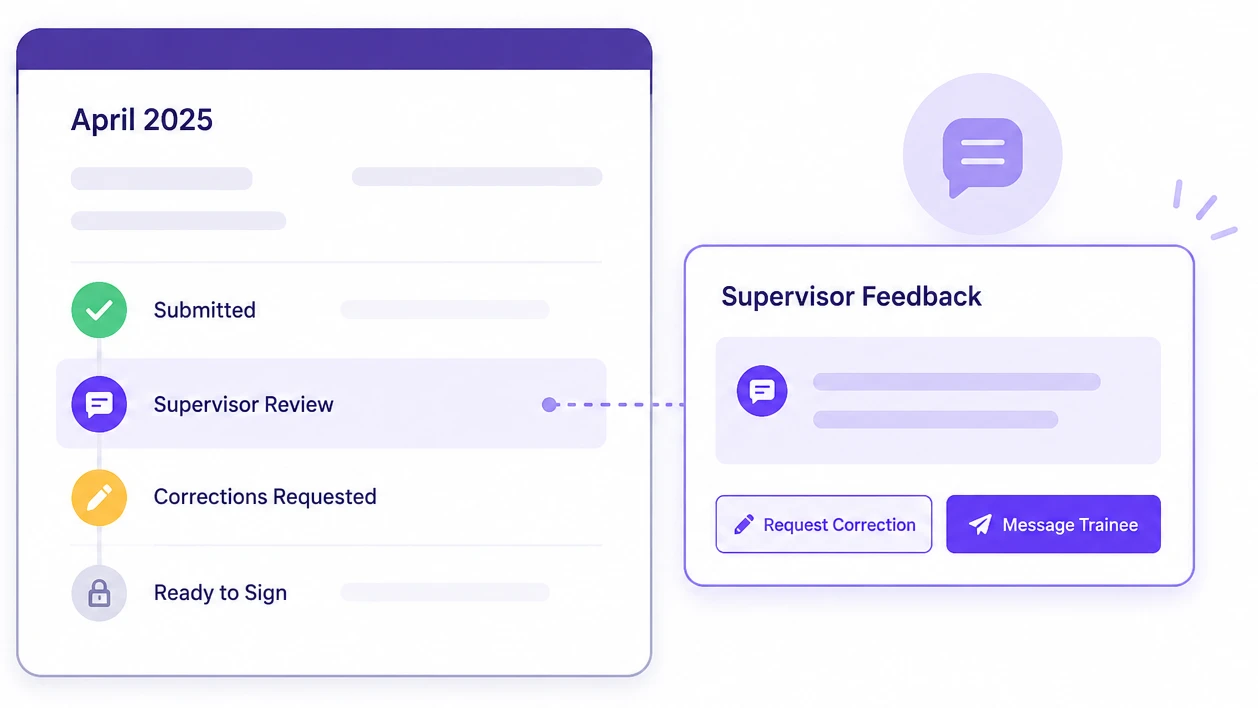
Keep Review Comments Connected to the Right Record
Supervisor feedback is easier to manage when it stays attached to the trainee’s fieldwork workflow. With FieldworkABA, you can:
- Review entries before signing.
- Leave feedback on records that need clarification.
- Request corrections before signing.
- Message trainees inside the platform.
- Track whether a month is still pending, corrected, or ready to sign.
- Keep feedback connected to the right trainee and month.
Sign Monthly Records Without Printing or Scanning
When a trainee’s month is ready, you can review the record and add your e-signature electronically. That means fewer PDF downloads, fewer email attachments, and less manual follow-up.
No Printing
Review and sign directly inside the workflow.
No Scanning
Signed records stay connected to the trainee’s month.
Fewer Email Threads
Feedback, corrections, and sign-off stay easier to follow.
Cleaner Documentation
Signed monthly records remain organized for long-term access.

Reviewing Trainees Who Already Started Somewhere Else?
Trainees do not have to start over. They can create an account, upload spreadsheets, PDFs, signed forms, or old tracker records, and our team can manually help migrate their previous fieldwork records. That gives supervisors a cleaner view of past and current records in one place.
- Bring spreadsheets, PDFs, signed forms, another tracker’s exports, and paper logs
- Our team helps migrate trainees’ previous fieldwork records
- Get a cleaner view of past and current records in one place
Have a trainee bringing records from somewhere else? Our team handles the migration for you. Just reach out and tell us what they have.
Contact Support About MigrationTrusted by Supervisors
I supervise several trainees at once, and FieldworkABA makes it much easier to see who needs my attention. Instead of opening spreadsheets, emails, and PDFs, I can review each trainee’s month in one place and know what is ready to sign.
The biggest benefit for me is keeping feedback connected to the right trainee record. If something needs clarification, I can leave a note, request a correction, and come back to the same month without searching through email threads.
FieldworkABA saves time at the end of the month. Trainees can log throughout the month, I can review their entries, and when the record is ready, I can e-sign without printing or scanning anything.
Managing multiple trainees used to feel scattered. FieldworkABA gives me a clearer view of progress, pending reviews, corrections, and signed records, so supervision review feels much more organized.
Manage Trainee Fieldwork Without the Back-and-Forth
Create your free supervisor account and manage trainee records, review monthly progress, leave feedback, request corrections, and e-sign forms in one organized workspace.
Questions? Visit Support.